Guides6 min read
Phone photography tips that make photos look professional
Phone photography tips that work: light, composition, focus lock, a clean lens, portrait and night mode, simple edits, and exercises to try today.
Phone photos look amateur for a handful of reasons: flat or harsh light, a busy frame, focus on the wrong thing, a smudged lens and heavy filters. Fix those and a photo starts to look deliberate, which is most of what people mean by professional. These phone photography tips come in the order that matters, each with an exercise you can do today.
None of them needs a new phone or a paid app, only the patience to take the same photo several times.
Phone photography tips start with light
Light decides more than the phone does. The same street looks flat at noon and rich an hour before sunset, because low sun comes from the side, throws long shadows and shows texture.
- Golden hour: roughly the first hour after sunrise and the last before sunset, when the light is warm and soft.
- Blue hour: the short stretch after sunset (and before sunrise) when the sky turns deep blue and the street lights come on. It often lasts only 20 to 40 minutes, depending on place and season.
- Window light: indoors, put your subject beside a window and switch the ceiling light off so the colours don’t mix. A sheet of white paper on the shadow side softens it.
- Skip the flash: a tiny light right next to the lens flattens faces, makes skin shine and turns the background black. Move closer to a lamp, or have a friend hold a second phone’s torch off to one side.
Try this today: photograph the same mug or face three times by a window: facing it, side-on and with the window behind. The side-on version usually wins.
Composition: thirds, lines, space, symmetry and a low angle
Turn on the grid in your camera settings. It’s the cheapest composition teacher there is.
- Rule of thirds: put the subject where two lines cross, and the horizon on a line, not through the middle.
- Leading lines: roads, rails, fences and shorelines pull the eye. Stand so they run towards your subject.
- Negative space: a small subject in a lot of empty sky or wall looks calm and intentional, not lost.
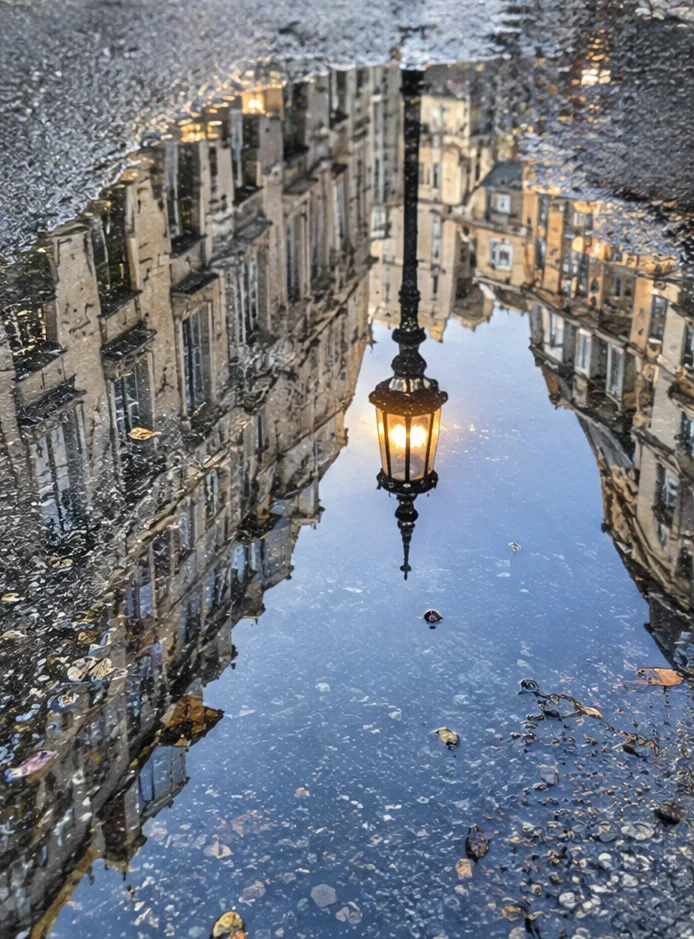
- Symmetry: when a scene is symmetrical, like a staircase or a reflection in still water, ignore the thirds and centre it exactly.
- A low angle: crouch or put the phone on the ground. Small things grow, and a messy background turns into sky.
Try this today: take ten photos of one object without repeating yourself: centred, on a third, from the floor, from above, with a line leading to it, with lots of space. Two or three will stand out, and rarely the first.
Clean the lens, then lock focus and exposure
A phone lens lives in pockets and next to fingers, and a film of skin oil makes photos hazy and puts a glow around every light. Wipe it with a soft cotton or microfibre cloth before you shoot.
Tap your subject to focus; most phones also set the brightness from that point and show a slider to adjust it. To keep both while you reframe, lock them. On an iPhone, touch and hold the subject until AE/AF Lock appears, as Apple’s guide explains; a tap on the screen releases it. On a Pixel, tap the subject and then tap Lock, as Google’s help describes (both checked on 8 November 2026). On other phones, try a long press on the subject.
With a bright sky, expose for the sky and let the ground go darker. Detail lost in pure white can’t be brought back, while a slightly dark photo is easy to lift.
Try this today: photograph a lamp, wipe the lens and shoot again, then compare the halo. Then face a bright window from inside and lock the exposure once on the window and once on the room.
Portrait mode and night mode: what they can’t do
Portrait mode’s blur is made by software that guesses where your subject ends, and it often guesses wrong around hair, glasses, a wine glass or the gap between an arm and a body. Check the edges at full size, and if your phone lets you change the blur afterwards, turn it down a notch. Real blur is free: step closer to your subject and further from the background.
Night modes keep capturing for a while, so a shaking hand or a moving subject smears. On iPhone 11 and later, Night mode turns on by itself in low light and shows how many seconds the shot will take, and the flash or Live Photos switch it off (Apple). On Pixel phones, Night Sight turns on automatically in low light in Photo and Portrait mode, but not with the flash on (Google). Both checked on 8 November 2026.
Hold still until the count ends, with your elbows against your chest or the phone on a bench. Use the main lens rather than zooming, since it usually gathers the most light, and don’t brighten night into day.
Try this today: go out ten minutes after sunset and photograph the same street at ten, twenty and thirty minutes past. You’ll watch the blue hour arrive and leave.
Editing basics: exposure, contrast, white balance and crop
The editor in your gallery app is enough. Use four tools, in this order:
- Crop and straighten. Level the horizon and cut whatever doesn’t belong.
- Exposure. Set the overall brightness; if the clouds lose their detail, pull back.
- Contrast. A little adds punch. Too much turns shadows into black holes.
- White balance (often called warmth or temperature). Make white things white: indoor bulbs push photos orange, shade pushes them blue.
Then compare with the original. If people would notice the edit before the photo, you’ve gone too far, and full-strength filters usually do.
Try this today: edit one photo with only these four tools in under two minutes. Fast edits stay subtle.
Tell a story in one frame
A professional-looking photo says something. Aim for one subject, one moment and one detail that hints at what came before or comes next: two coffee cups with one still full, a suitcase by the door, muddy boots on a clean floor.
Keep a little of the place and leave out everything else. Wait for the gesture or the laugh, and shoot a burst. If the photo needs a caption to make sense, look for a better frame.
Try this today: photograph “someone just left” without a person in the frame. A chair, a coat, a cooling cup of tea: it’s harder than it sounds.
For a reason to shoot every day, the Photo world on Vibnelo has a new dare of the day every midnight (UTC), with themes such as Blue hour, From the ground, Perfect symmetry and Reflection. Your photo goes into blind battles, where people see two photos side by side without names and pick the better one, and the winners climb the world’s chart. Where a photo was taken and with which camera are removed before it uploads. Voting needs no account; posting takes a free one (from 16). Here’s why our battles are blind, and if you make music, one strong photo is all you need for a lyric video.
Questions people ask
How do I make my phone photos look professional?
Start with light: shoot near a window or in the golden hour, and skip the flash. Keep one clear subject, a straight horizon and a clean lens, then edit lightly.
Should I use portrait mode for every photo?
No. It works best for a person or an object well away from the background. For landscapes, groups and fine detail, the normal photo mode is safer.
Why are my night photos blurry?
Night shots take longer to capture, so a moving hand or subject smears. Brace the phone, hold still until the capture finishes and use the main lens instead of zooming.
When is the golden hour?
Roughly the first hour after sunrise and the last hour before sunset. The times change daily, so check your local sunset and arrive early.
Do I need an editing app?
No. The editor built into your gallery has exposure, contrast, white balance and crop, which covers most of what a good edit needs.
Hear it in Vibnelo
Grad u lokvi. · Lucija Kadar
Grad u lokvi.
The photo at the top comes from this hook. Play it and watch the words light up as they are sung.
Play the hook